Xournal, génial pour annoter des PDFs
By Pierre-Alain B on Saturday, November 1 2014, 07:59 - Permalink
Xournal est un très simple et très pratique outil pour annoter des PDFs. Indispensable aujourd'hui quand nous recevons des formulaires par dizaines sous format PDF ou qu'il est habituel de collaborer sur des documents PDF.
L'emploi est fort simple : on ouvre le PDF avec Xournal, on utilise l'un des outils d'écriture ou de dessin (crayon, surligneurs, règle...) pour annoter puis on exporte le nouveau PDF.
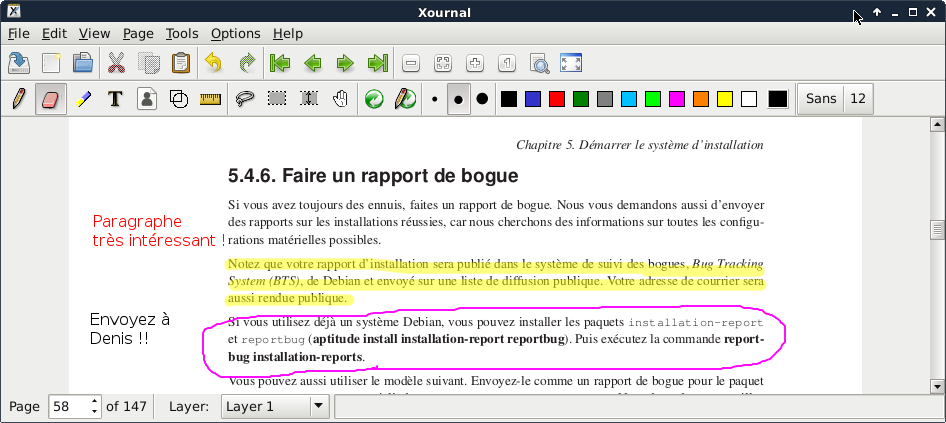
Xournal est disponible au téléchargement ici : http://xournal.sourceforge.net/. Sur Linux, vous le trouverez sans doute dans votre système de paquets, sur Windows, vous pourrez télécharger la petite archive contenant l'exécutable et ses dépendances.
Souhaitant déployer l'outil sur tous les postes informatiques (Windows) de mon entreprise, j'ai fabriqué un installateur simple pour l'outil à l'aide de NSIS. Par défaut, les installateurs de NSIS acceptent d'être appelés en mode silencieux à l'aide du paramètre "/S" et l'installateur généré peut être utilisé pour un déploiement en masse avec un outil comme Updatengine.
Télécharger l'installateur
Testé fonctionnel sur Windows 7 32 bits et 64 bits. xournal-0.4.8-win32-installer.exe
Le code de génération de l'installateur avec NSIS :
!define APPNAME "Xournal"
!define DESCRIPTION "Annotate PDF"
# These three must be integers
!define VERSIONMAJOR 0
!define VERSIONMINOR 4
!define VERSIONBUILD 8
!define INSTALLSIZE 7233

RequestExecutionLevel admin ;Require admin rights on NT6+ (When UAC is turned on)

InstallDir "$PROGRAMFILES\${APPNAME}"

# This will be in the installer/uninstaller's title bar
Name "${APPNAME}"
Icon "xournal.ico"
outFile "xournal-0.4.8-win32-installer.exe"

!include LogicLib.nsh

# Just 2 pages - install location and installation
page directory
Page instfiles

!macro VerifyUserIsAdmin
UserInfo::GetAccountType
pop $0
${If} $0 != "admin" ;Require admin rights on NT4+
        messageBox mb_iconstop "Administrator rights required!"
        setErrorLevel 740 ;ERROR_ELEVATION_REQUIRED
        quit
${EndIf}
!macroend

function .onInit
	setShellVarContext all
	!insertmacro VerifyUserIsAdmin
functionEnd

section "install"
	# Files for the install directory - to build the installer, these should be in the same directory as the install script (this file)
	setOutPath $INSTDIR
	# Files added here should be removed by the uninstaller (see section "uninstall")
	file "xournal.exe"
	file "xournal.ico"
	file "README.txt"
	file "*.dll"
	file /r "etc"
	file /r "html-doc"
	file /r "lib"
	file /r "pixmaps"
	file /r "share"
	# Add any other files for the install directory (license files, app data, etc) here

	# Uninstaller - See function un.onInit and section "uninstall" for configuration
	writeUninstaller "$INSTDIR\uninstall.exe"

	# Start Menu
	createDirectory "$SMPROGRAMS\${APPNAME}"
	createShortCut "$SMPROGRAMS\${APPNAME}\${APPNAME}.lnk" "$INSTDIR\xournal.exe" "" "$INSTDIR\xournal.ico"
	createShortCut "$SMPROGRAMS\${APPNAME}\Uninstall ${APPNAME}.lnk" "$INSTDIR\uninstall.exe" "" ""

	# Registry information for add/remove programs
	WriteRegStr HKLM "Software\Microsoft\Windows\CurrentVersion\Uninstall\${APPNAME}" "DisplayName" "${APPNAME} - ${DESCRIPTION}"
	WriteRegStr HKLM "Software\Microsoft\Windows\CurrentVersion\Uninstall\${APPNAME}" "UninstallString" "$"$INSTDIR\uninstall.exe$""
	WriteRegStr HKLM "Software\Microsoft\Windows\CurrentVersion\Uninstall\${APPNAME}" "QuietUninstallString" "$"$INSTDIR\uninstall.exe$" /S"
	WriteRegStr HKLM "Software\Microsoft\Windows\CurrentVersion\Uninstall\${APPNAME}" "InstallLocation" "$"$INSTDIR$""
	WriteRegStr HKLM "Software\Microsoft\Windows\CurrentVersion\Uninstall\${APPNAME}" "DisplayIcon" "$"$INSTDIR\xournal.ico$""
	WriteRegStr HKLM "Software\Microsoft\Windows\CurrentVersion\Uninstall\${APPNAME}" "DisplayVersion" "${VERSIONMAJOR}.${VERSIONMINOR}.${VERSIONBUILD}"
	WriteRegDWORD HKLM "Software\Microsoft\Windows\CurrentVersion\Uninstall\${APPNAME}" "VersionMajor" ${VERSIONMAJOR}
	WriteRegDWORD HKLM "Software\Microsoft\Windows\CurrentVersion\Uninstall\${APPNAME}" "VersionMinor" ${VERSIONMINOR}
	# There is no option for modifying or repairing the install
	WriteRegDWORD HKLM "Software\Microsoft\Windows\CurrentVersion\Uninstall\${APPNAME}" "NoModify" 1
	WriteRegDWORD HKLM "Software\Microsoft\Windows\CurrentVersion\Uninstall\${APPNAME}" "NoRepair" 1
	# Set the INSTALLSIZE constant (!defined at the top of this script) so Add/Remove Programs can accurately report the size
	WriteRegDWORD HKLM "Software\Microsoft\Windows\CurrentVersion\Uninstall\${APPNAME}" "EstimatedSize" ${INSTALLSIZE}
sectionEnd


# Uninstaller
function un.onInit
	SetShellVarContext all

	#Verify the uninstaller - last chance to back out
	MessageBox MB_OKCANCEL "Permanantly remove ${APPNAME}?" IDOK next
		Abort
	next:
	!insertmacro VerifyUserIsAdmin
functionEnd

section "uninstall"
	# Remove Start Menu launcher
	delete "$SMPROGRAMS\${APPNAME}\${APPNAME}.lnk"
	delete "$SMPROGRAMS\${APPNAME}\Uninstall ${APPNAME}.lnk"
	# Try to remove the Start Menu folder - this will only happen if it is empty
	rmDir "$SMPROGRAMS\${APPNAME}"

	# Remove files
	delete $INSTDIR\xournal.exe
	delete $INSTDIR\xournal.ico
	delete $INSTDIR\README.txt
	delete $INSTDIR\*.dll
	rmDir /r $INSTDIR\etc
	rmDir /r $INSTDIR\html-doc
	rmDir /r $INSTDIR\lib
	rmDir /r $INSTDIR\pixmaps
	rmDir /r $INSTDIR\share

	# Always delete uninstaller as the last action
	delete $INSTDIR\uninstall.exe

	# Try to remove the install directory - this will only happen if it is empty
	rmDir $INSTDIR

	# Remove uninstaller information from the registry
	DeleteRegKey HKLM "Software\Microsoft\Windows\CurrentVersion\Uninstall\${APPNAME}"
sectionEnd